Randomness & Spotify's Shuffle Play
Background
As a long-time Spotify user with a go-to playlist of around 2,500 songs, I often find myself surprised at how quickly my listening experience becomes dull and repetitive, even when using the shuffle feature. Within an hour or two, I seem to be confronted with a now familiar sense of monotony and staleness. Ideally, a "shuffling" function should deliver a song queue that maintains a sense of variety and freshness, without the need to constantly refresh the cache.
The Concept of Randomness
To delve deeper into the issue, it's essential to understand what randomness truly is. In various fields, randomness can mean slightly different things, but it generally refers to the lack of pattern or predictability in events. In cryptography, for example, randomness means unpredictability—an attacker should not be able to predict the next bit with greater than 50% accuracy. True randomness is derived from physical processes, such as radioactive decay or thermal noise, which are inherently unpredictable.
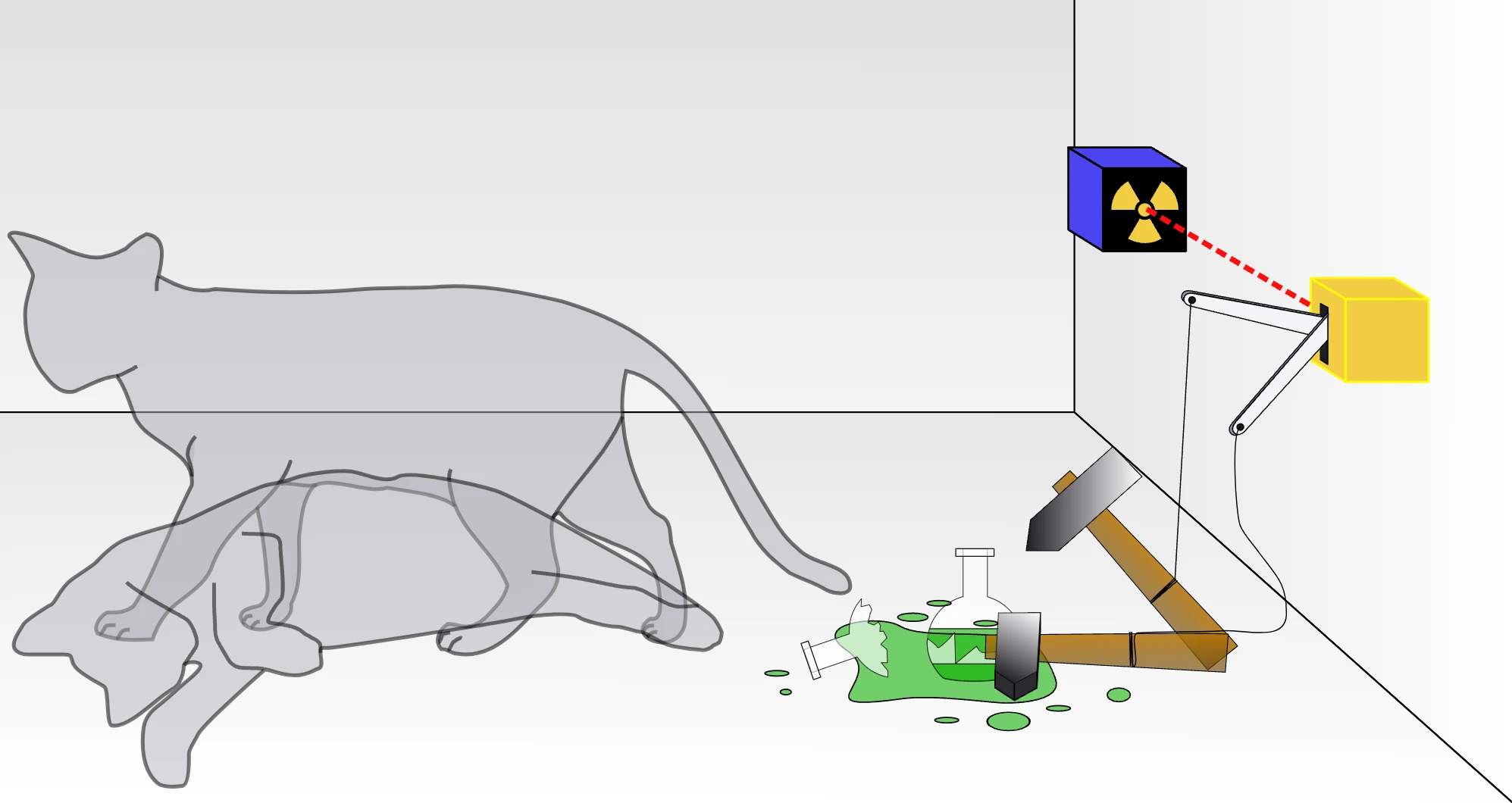
Schrodinger's Cat: An Example of True Randomness
Schrodinger's cat is a famous thought experiment that illustrates the concept of quantum superposition and true randomness. In this scenario, a cat is placed in a sealed box with a radioactive atom, a Geiger counter, and a vial of poison. If the Geiger counter detects radiation (a random event), the vial is broken, and the cat is killed. Until the box is opened, the cat is simultaneously alive and dead, representing true randomness in quantum mechanics.
Randomness in Computer Algorithms
Computers, by their nature, are deterministic machines—they execute the same code with the same inputs to produce the same outputs every time. This predictability is beneficial for reliability but problematic for applications requiring unpredictability, like cryptography or shuffle algorithms. To generate randomness, computers use cryptographically secure pseudorandom number generators (CSPRNGs), which take an unpredictable input (seed) and produce a much larger stream of unpredictable output.
The Issue with Spotify's Shuffle
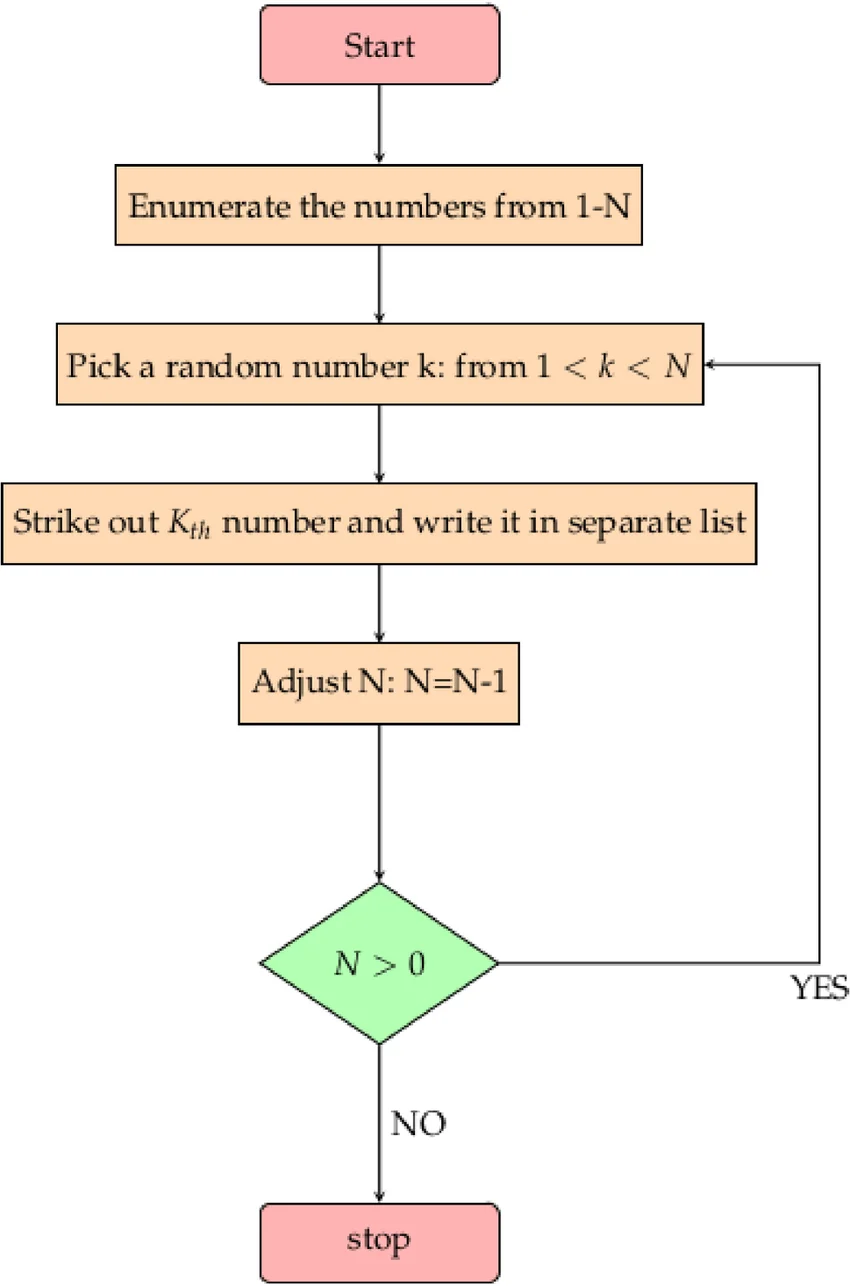
The root of the issue lies in the fact that Spotify's shuffle feature was initially not perceived as truly randomized by users. Originally, Spotify employed the Fisher-Yates shuffle to generate a perfectly random order of songs in a playlist. However, the nature of true randomness means that:
- The same artist's songs could appear consecutively.
- Different artists' songs could be evenly distributed.
This led to user complaints about the perceived lack of randomness. Users often fell victim to the gambler's fallacy, expecting that if they just heard a song from a particular artist, the next song would be more likely from a different artist, which is not true in a perfectly random order. As Lukáš Poláček explains in a 2014 Spotify blog post, How to Shuffle Songs:
"At first we didn't understand what the users were trying to tell us by saying that the shuffling is not random, but then we read the comments more carefully and noticed that some people don't want the same artist playing two or three times within a short time period."
Algorithm Changes in 2016
To address these complaints, Spotify adopted a new algorithm, inspired by dithering techniques used in image processing. The main idea is to spread out songs by the same artist as evenly as possible throughout the playlist.
"The main idea is very similar to the methods used in dithering. Suppose we have a black and white picture that uses a few hundred shades of gray. We would like to simplify the picture even further by using only pixels of two colors, black and white. We could use random sampling: say a pixel has an 80% shade of gray, then it will have 80% chance of becoming black and 20% chance of becoming white. We process pixels one by one and for each one we randomly decide its new color based on the original shade of gray. However, the result is very far from satisfactory."
Technical Specifications and Algorithm Details
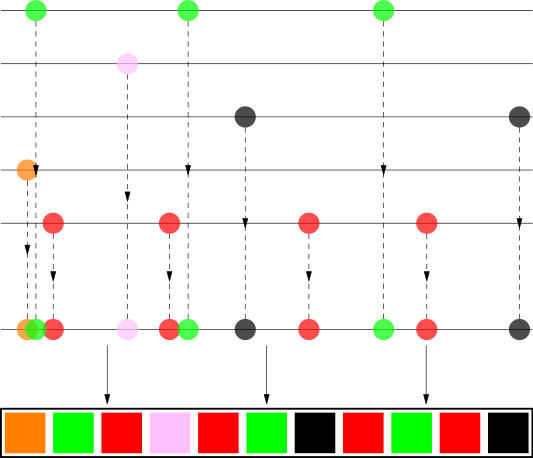
The algorithm works as follows:
- Artist Spread: For each artist, their songs are distributed along the playlist length with a random offset to avoid clustering at the start.
- Intra-Artist Shuffle: Songs by the same artist are shuffled among themselves using the Fisher-Yates shuffle or a recursive application of the same algorithm to prevent songs from the same album playing too close to each other.
- Final Assembly: All songs are collected and ordered by their positions, resulting in a playlist where songs from the same artist are nicely spread out, appearing random to the human eye.
"Suppose we have a playlist containing some songs by The White Stripes, The xx, Bonobo, Britney Spears (Toxic!) and Jaga Jazzist. For each artist we take their songs and try to stretch them as evenly as possible along the whole playlist. Then we collect all songs and order them by their position. A picture is better than a thousand words."
My Conclusions
Despite all of these measures to have a more appealing visual representation of randomness, it is not random. I prefer the comfort of knowing that my shuffle is truly shuffling; I invite the entropic appearance of consecutive artists. In Spotify's case, their efforts to make a true variety seem somehow more various has had an opposite effect.
In fact, I seek something even more random than the previously used Fisher-Yates model. As discussed earlier, true randomness is derived from inherently unpredictable physical processes, such as radioactive decay or thermal noise. The Fisher-Yates shuffle, while mathematically sound, still relies on pseudorandom number generation, which can never achieve the same level of randomness as these natural phenomena.
Introducing LavaRand: A Path to True Randomness
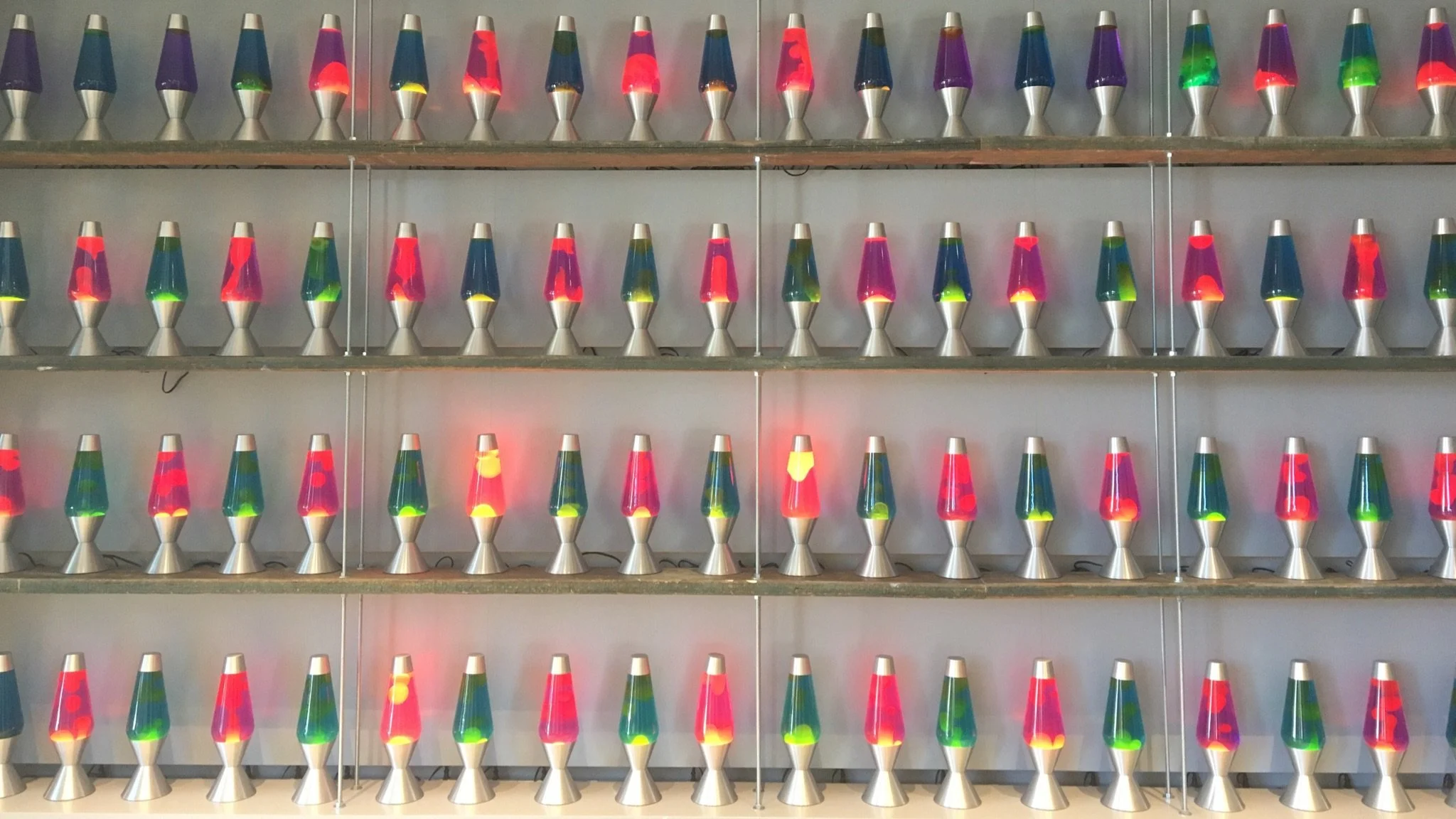
To address these limitations, much like how Spotify looked to dithering as a means for randomness, we can look to innovative methods like LavaRand, which Cloudflare uses for cryptographic randomness. LavaRand leverages the unpredictable patterns of lava lamps to generate true randomness. A camera captures the motion of the lava lamps, where each image is a snapshot of the chaotic state of the lamps at a given moment. The captured images are digitized into large numerical values which are used to seed a Cryptographically Secure Pseudorandom Number Generator (CSPRNG). The CSPRNG processes these seeds to produce a stream of random values that can be used by Cloudflare's production servers. This approach ensures a high degree of unpredictability, as the physical process of the lava lamps is inherently random.
By applying similar principles and incorporating a source of real-world entropy, we can harness the entropy of LavaRand and revert the algorithm to a state of even truer unpredictability.
Training a Model
The first step in my process to create a Lavarand-type system was to train a visual model to detect orbs and fluctuations in lava lamps. This was achieved by using the Ultralytics YOLO (You Only Look Once) model, specifically the YOLOv8 variant, which is known for its efficiency in object detection tasks.
In this case the model is already pretrained on the COCO objects dataset, which provides a robust starting point for further training. The train_model function trains the loaded model using various parameters such as the path to the dataset configuration (data_yaml), number of epochs (100), batch size (16), image size (640), number of workers (4), automatic mixed precision (AMP), data augmentation, initial learning rate (lr0 of 0.001), validation flag, and model save period (every 10 epochs).
from ultralytics import YOLO
from tqdm import tqdm
import torch

def load_model(checkpoint_path=None):
    if checkpoint_path:
        model = YOLO(checkpoint_path)
    else:
        model = YOLO('yolov8n.yaml')
    return model

def train_model(model, data_yaml, epochs=100, batch_size=16, img_size=640, workers=4, amp=True,
                augment=True, lr0=0.001, val=True, save_period=10):
    results = model.train(
        data=data_yaml,
        epochs=epochs,
        batch=batch_size,
        imgsz=img_size,
        workers=workers,
        amp=amp,
        augment=augment,
        lr0=lr0,
        val=val,
        save_period=save_period
    )
    return results

def main():
    data_yaml = 'data.yaml'
    last_checkpoint = 'last.pt'

    if last_checkpoint:
        model = load_model(last_checkpoint)
    else:
        model = load_model()

    train_results = train_model(
        model=model,
        data_yaml=data_yaml,
        epochs=100,
        batch_size=16,
        img_size=640,
        workers=4,
        amp=True,
        augment=True,
        lr0=0.001,
        val=True,
        save_period=10
    )

    print(train_results)

if __name__ == '__main__':
    main()
The main function sets the paths for the dataset and the last checkpoint, loads the model accordingly, and then trains it using the specified parameters. Finally, it prints the training results. The code is executed when the script is run directly, invoking the main function.
The dataset used in training, validating, and testing the model was a combination of two pre-existing Roboflow datasets: Lavalamp Dataset 1 & Lavalamp Dataset 2. All props and credit to the owners/creators of these two datasets, they saved me a ton of time by not needing to manually compile and mark hundreds images of lava lamps.
Results:
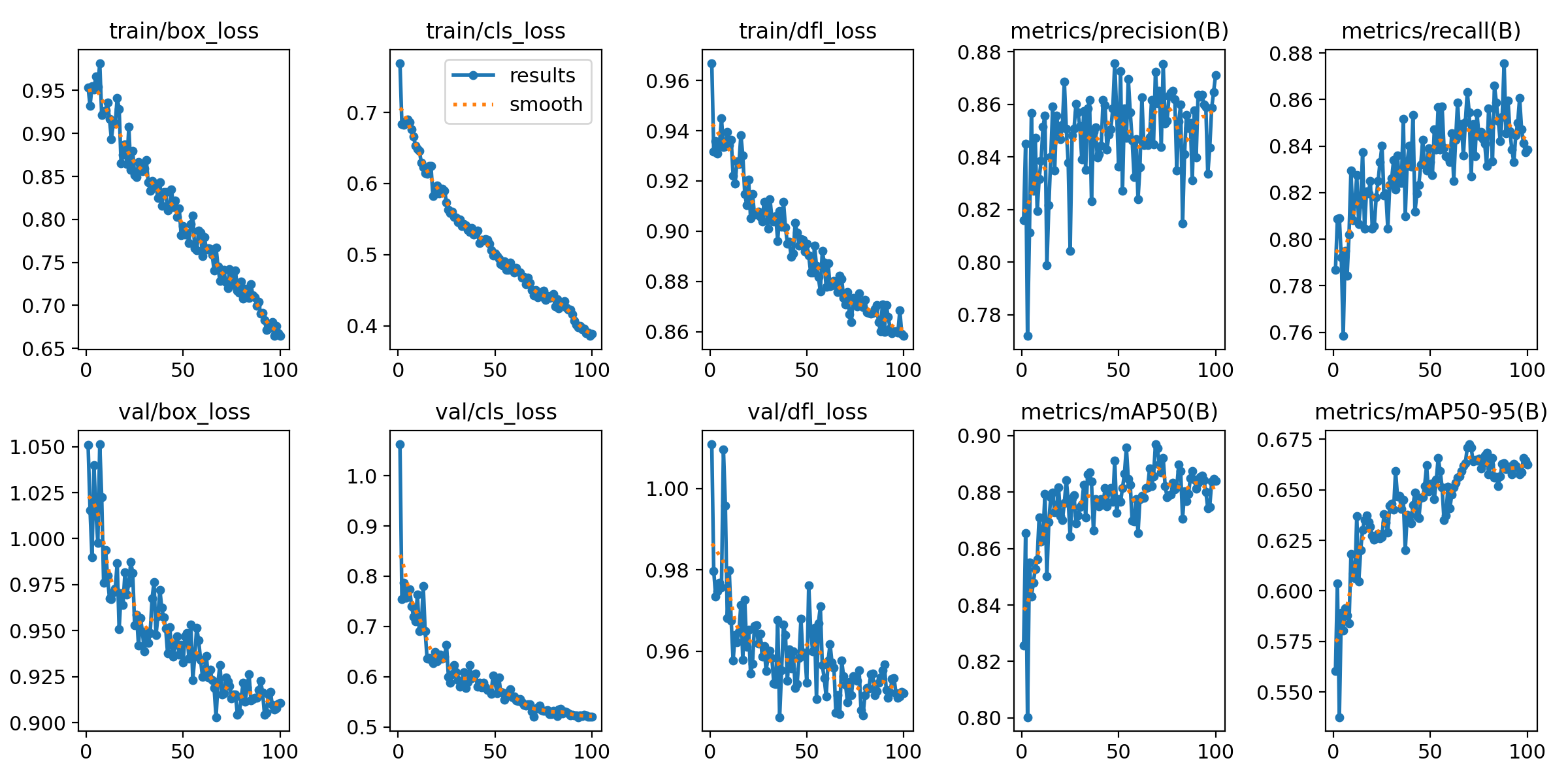
The training results are visualized in the provided plot, which shows the loss and performance metrics over the epochs.
- Training and Validation Loss: Both training and validation losses (box loss, class loss, DFL loss) show a decreasing trend, indicating that the model is learning effectively.
- Precision and Recall: The precision and recall metrics exhibit an upward trend, suggesting that the model's ability to correctly identify and classify objects is improving.
- mAP (Mean Average Precision): The mAP metrics (mAP50 and mAP50-95) also show an increasing trend, indicating that the model's overall performance in object detection is getting better over time.
Implementation of Trained Model
Object Detection with YOLO
Using YOLO as our base system applies really well to the art of detecting amorphous fluctuations, like those found in lava lamps, as it operates by dividing the image into a grid and predicting bounding boxes and class probabilities for each grid cell. The leads to a real-time model that can detect multiple objects within a single frame with high accuracy and speed.
import cv2
from ultralytics import YOLO

class ObjectDetector:
    def __init__(self, model_path):
        self.model = YOLO(model_path)

    def detect(self, frame, confidence_threshold=0.85):
        results = self.model.predict(frame, conf=confidence_threshold, verbose=False)
        return results[0].boxes.data.tolist()
In our implementation, the ObjectDetector class is initialized with the path to the pre-trained YOLO model. The detect method takes a video frame and a confidence threshold as inputs, and returns a list of detected bounding boxes that meet the confidence threshold.
Keypoint Tracking with ORB
Following the detection of the lava lamp, the next step involves tracking its chaotic motion. We utilize the ORB (Oriented FAST and Rotated BRIEF) algorithm for this purpose. ORB is a robust feature detector and descriptor that is well-suited for real-time applications. It combines the FAST keypoint detector and the BRIEF descriptor with modifications to improve rotation invariance and robustness to noise. Way too many acronyms.
class OrbTracker:
    def __init__(self, tracking_frames=5):
        self.tracking_frames = tracking_frames
        self.prev_keypoints = None
        self.tracking_counter = 0

    def track(self, frame, lava_lamp_box):
        x, y, w, h = map(int, lava_lamp_box)
        lava_lamp_roi = frame[y:y+h, x:x+w]
        lava_lamp_roi = cv2.resize(lava_lamp_roi, (256, 256))
        gray = cv2.cvtColor(lava_lamp_roi, cv2.COLOR_BGR2GRAY)
        blurred = cv2.GaussianBlur(gray, (11, 11), 0)
        orb = cv2.ORB_create()
        keypoints, descriptors = orb.detectAndCompute(blurred, None)
        self.prev_keypoints = keypoints
        return keypoints
The OrbTracker class is initialized with the number of frames to track. The track method takes a video frame and the bounding box of the detected lava lamp as inputs. It extracts the region of interest (ROI) corresponding to the lava lamp, converts it to grayscale, applies Gaussian blur, and then uses the ORB algorithm to detect and compute keypoints within the ROI.
Random Number Generation
The keypoints detected by the ORB algorithm serve as the source of entropy for generating true random numbers. We concatenate the coordinates and sizes of the keypoints into a string, which is then hashed using the SHA-256 algorithm to produce a random number. The SHA-256 algorithm is a cryptographic hash function that generates a fixed-size (256-bit) hash value from an input string, ensuring a high degree of randomness and unpredictability.
import hashlib

class LavaLampRandomGenerator:
    def __init__(self, video_source=0, model_path="custom_model.pt", tracking_frames=5, confidence_threshold=0.7):
        self.video_source = video_source
        self.model_path = model_path
        self.tracking_frames = tracking_frames
        self.confidence_threshold = confidence_threshold
        self.object_detector = ObjectDetector(model_path)
        self.fast_tracker = OrbTracker(tracking_frames)

    def generate_random_number(self, blob_data, min_value=0, max_value=16000):
        blob_string = ''.join(str(x) for x in blob_data)
        hash_value = hashlib.sha256(blob_string.encode()).hexdigest()
        hash_int = int(hash_value, 16)

        range_size = max_value - min_value + 1
        while True:
            random_number = hash_int % range_size
            if random_number < range_size:
                break
            hash_value = hashlib.sha256(hash_value.encode()).hexdigest()
            hash_int = int(hash_value, 16)

        return min_value + random_number
Here, the LavaLampRandomGenerator class is initialized with the video source, model path, number of tracking frames, and confidence threshold. The generate_random_number method takes the blob data (keypoints) as input, concatenates the keypoint coordinates and sizes into a string, and hashes the string using SHA-256.
It's at this point that either the original concatenated string or the returned SHA-256 hash could be used to seed a CSPRNG (Cryptographically Secure Pseudo-Random Number Generator). However, in this method, we convert the hash value to an integer for use in a modulo operation.
The modulo operation, represented by the % symbol, calculates the remainder after division of one number by another. For example, 7 % 3 yields 1 because when 7 is divided by 3, the quotient is 2 with a remainder of 1. This operation is essential for mapping the potentially large integer derived from the SHA-256 hash to a specific range. By performing hash_int % (max_value - min_value + 1), we constrain the integer to fall between min_value and max_value. Adding min_value adjusts this range appropriately.
The resulting integer is then mapped to the desired range to produce a random number. This complements the LavaRand functioning, which uses the chaotic nature of a lava lamp to generate randomness.
To ensure uniform distribution and avoid biases, the method also employs rejection sampling. Rejection sampling involves generating candidate samples and discarding those that do not meet certain criteria, ensuring that the final samples are uniformly distributed. By discarding biased samples, rejection sampling helps in maintaining the integrity of the random number generation process, ensuring that each possible number within the range is equally likely to be chosen.
Spotify Integration
The integration with Spotify and the main application interface are critical components of this project. These components ensure that the generated random numbers are effectively used to create a truly randomized Spotify queue. Below, we provide a detailed technical description of the Spotify integration and the main application interface.
Spotify API Authentication and Playlist Retrieval
The SpotifyRandomQueue class handles the interaction with the Spotify API. This class is responsible for authenticating the user, retrieving playlists and tracks, and queuing songs based on the generated random indices.
The SpotifyRandomQueue class uses the spotipy library to authenticate with the Spotify API and retrieve the user's playlists and tracks. The authentication process requires the user's Spotify client ID, client secret, and redirect URI.
from spotipy import SpotifyOAuth
import spotipy

class SpotifyRandomQueue:
    def __init__(self, spotify_client_id, spotify_client_secret, spotify_redirect_uri):
        self.spotify_client_id = spotify_client_id
        self.spotify_client_secret = spotify_client_secret
        self.spotify_redirect_uri = spotify_redirect_uri
        self.sp = spotipy.Spotify(auth_manager=SpotifyOAuth(client_id=self.spotify_client_id,
                                                            client_secret=self.spotify_client_secret,
                                                            redirect_uri=self.spotify_redirect_uri,
                                                            scope="playlist-read-private user-modify-playback-state"))

    def get_user_playlists(self):
        playlists = self.sp.current_user_playlists()['items']
        return playlists

    def get_playlist_tracks(self, playlist_id):
        playlist_tracks = self.sp.playlist_items(playlist_id, additional_types=['track'])
        tracks = playlist_tracks['items']
        while playlist_tracks['next']:
            playlist_tracks = self.sp.next(playlist_tracks)
            tracks.extend(playlist_tracks['items'])
        return [track['track'] for track in tracks if 'track' in track]
Queueing Random Songs
The queue_random_songs method queues songs from the selected playlist based on the generated random indices. This method retrieves the tracks from the specified playlist and queues the songs at the indices specified by the random numbers.
     def queue_random_songs(self, playlist_id, random_indices):
        playlist_tracks = self.get_playlist_tracks(playlist_id)
        queued_songs = [playlist_tracks[index] for index in random_indices if index < len(playlist_tracks)]
        song_uris = [song['id'] for song in queued_songs]
        for uri in song_uris:
            self.sp.add_to_queue(uri)
        return queued_songs
Main Application Interface
The LavaLampApp class provides a graphical user interface (GUI) for the application using the tkinter library. This GUI allows the user to start the random number generation process, select a Spotify playlist, specify the number of songs to queue, and view the queued songs. Below, we delve into the implementation details of the main application interface.
Initialization and UI Setup
The LavaLampApp class is initialized with the root window of the tkinter application. The setup_ui method sets up the user interface, including the "Start" and "Quit" buttons.
class LavaLampApp:
    def __init__(self, root):
        self.root = root
        self.root.title("Lava Lamp Random Number Generator")
        self.generator = LavaLampRandomGenerator(video_source=0, model_path="runs/run2/weights/last.pt")
        self.spotify_random_queue = None

        self.setup_ui()

    def setup_ui(self):
        self.start_button = tk.Button(self.root, text="Start", command=self.start)
        self.start_button.pack(pady=20)

        self.quit_button = tk.Button(self.root, text="Quit", command=self.root.quit)
        self.quit_button.pack(pady=20)
Start Process
The start method initiates the random number generation process. It first checks if the user has canceled the process. If not, it proceeds to authenticate with Spotify and retrieve the user's playlists.
    def start(self):
        if not self.generator.display_only():
            messagebox.showinfo("Info", "User canceled. Exiting.")
            return

        spotify_client_id = os.getenv("CLIENT_ID")
        spotify_client_secret = os.getenv("CLIENT_SECRET")
        spotify_redirect_uri = os.getenv("REDIRECT_URI")
        self.spotify_random_queue = SpotifyRandomQueue(spotify_client_id,
                                                       spotify_client_secret,
                                                       spotify_redirect_uri)

        user_playlists = self.spotify_random_queue.get_user_playlists()
        playlist_names = [playlist['name'] for playlist in user_playlists]

        playlist_index = self.select_playlist(playlist_names)
        if playlist_index is None:
            return

        selected_playlist = user_playlists[playlist_index]
        playlist_id = selected_playlist['id']
        playlist_length = selected_playlist['tracks']['total']

        num_songs = self.get_num_songs()
        if num_songs is None:
            return

        random_indices = self.generate_random_indices(num_songs, playlist_length)
        if not random_indices:
            return

        queued_songs = self.spotify_random_queue.queue_random_songs(playlist_id,
                                                                    random_indices)
        self.display_queued_songs(queued_songs)
Playlist Selection & Queue Length
The select_playlist method displays a new window with a list of available playlists. The user selects a playlist, and the method returns the index of the selected playlist.
The get_num_songs method prompts the user to enter the number of songs to queue. It validates the input and returns the number of songs.
    def select_playlist(self, playlist_names):
        playlist_window = tk.Toplevel(self.root)
        playlist_window.title("Select Playlist")

        tk.Label(playlist_window, text="Available playlists:").pack(pady=10)
        playlist_listbox = tk.Listbox(playlist_window)
        for name in playlist_names:
            playlist_listbox.insert(tk.END, name)
        playlist_listbox.pack(pady=10)

        selected_index = []

        def on_select():
            selected_index.append(playlist_listbox.curselection())
            if selected_index[0]:
                playlist_window.destroy()
            else:
                messagebox.showwarning("Warning", "Please select a playlist.")

        select_button = tk.Button(playlist_window, text="Select", command=on_select)
        select_button.pack(pady=10)

        self.root.wait_window(playlist_window)
        return selected_index[0][0] if selected_index else None

    def get_num_songs(self):
        num_songs_window = tk.Toplevel(self.root)
        num_songs_window.title("Number of Songs")

        tk.Label(num_songs_window, text="Enter the number of songs to queue:").pack(pady=10)
        num_songs_entry = tk.Entry(num_songs_window)
        num_songs_entry.pack(pady=10)

        num_songs = []

        def on_submit():
            try:
                num = int(num_songs_entry.get())
                if num <= 0:
                    raise ValueError("Number of songs must be positive.")
                num_songs.append(num)
                num_songs_window.destroy()
            except ValueError as e:
                messagebox.showerror("Error", str(e))

        submit_button = tk.Button(num_songs_window, text="Submit", command=on_submit)
        submit_button.pack(pady=10)

        self.root.wait_window(num_songs_window)
        return num_songs[0] if num_songs else None
Generating Random Indices
The generate_random_indices method generates random indices based on the blob data from the lava lamp. It ensures that the indices are unique and within the range of the playlist length.
    def generate_random_indices(self, num_songs, playlist_length):
        blob_data_list = []
        random_indices = []

        while len(random_indices) < num_songs:
            blob_data = self.generator.get_blob_data()

            if blob_data:
                blob_data_list.append(blob_data)
                random_index = self.generator.generate_random_number(blob_data, 0,
                                                                     playlist_length - 1)

                if random_index not in random_indices:
                    random_indices.append(random_index)
            else:
                print("No blob data found. Retrying...")

        # Display blob data used for RNG in a pop-up window
        blob_data_info = [
            f"Blob data {i} - Generated random index: {random_index} using: {blob_data}"
            for i, (blob_data, random_index) in
            enumerate(zip(blob_data_list, random_indices), start=1)
        ]
        self.display_info_window("Blob Data Used for RNG", blob_data_info)

        return random_indices
Displaying Run Information & Queued Songs
The display_info_window method displays a new window with a list of information. This is used to show the blob data used for random number generation.
The display_queued_songs method displays a new window with a list of the queued songs. This allows the user to see which songs have been added to the queue.
    def display_info_window(self, title, info_list):
        info_window = tk.Toplevel(self.root)
        info_window.title(title)

        window_frame = tk.Frame(info_window)
        window_frame.pack(fill=tk.BOTH, expand=True)

        listbox = tk.Listbox(window_frame, width=50, height=10)
        listbox.pack(side=tk.LEFT, fill=tk.BOTH)

        scrollbar = tk.Scrollbar(window_frame)
        scrollbar.pack(side=tk.RIGHT, fill=tk.BOTH)

        listbox.config(yscrollcommand=scrollbar.set)
        scrollbar.config(command=listbox.yview)

        for info in info_list:
            listbox.insert(tk.END, info)

    def display_queued_songs(self, queued_songs):
        songs_window = tk.Toplevel(self.root)
        songs_window.title("Queued Songs")

        tk.Label(songs_window, text="Queued Songs:").pack(pady=10)
        for i, song in enumerate(queued_songs, start=1):
            song_info = f"{i}. {song['name']} - {', '.join([artist['name'] for artist in song['artists']])}"
            tk.Label(songs_window, text=song_info).pack(pady=5)
Main Loop
The main loop initializes the LavaLampApp class and starts the tkinter main loop.
if __name__ == "__main__":
    root = tk.Tk()
    app = LavaLampApp(root)
    root.mainloop()
Demonstration
To see a very rought demonstration of the application in action, I've recorded the following. Funnily enough I actually do not own any lava lamps, so I had to use a random YouTube video as my own CloudFlare-esque wall:

Conclusion
Overall, the LavaRand project stood out to me as a super unique, intuitive way to tackle such seemingly complex/heady problems. I wanted to see if not only could I at least somewhat replicate the basic functionality, but also put my own twist onto it as well by targeting Spotify's shuffle. This is no hate to Spotify, I will happily continue to clear my cache instead of going through the whole process of setting up my phone to point at a YouTube video of lava lamps in order to shuffle. That's about that.