Hinterview - AI Interview Assistant
This project is primarily born out of my desire to incorporate a majority of the AI techniques/implementations I've used to date. It also gave me a nuanced technical introduction to using a virtual microphone setup through Blackhole (https://github.com/ExistentialAudio/BlackHole) and to creating a CLI program. All in all, Hinterview essentially allows the user to receive real-time answers to interview questions during an online based interview.
Features
- Audio Transcription with Whisper ASR: Quickly transcribe interview audio segments in real-time using OpenAI's powerful Whisper ASR system.
- Interactive CLI: An intuitive command-line interface designed with colorama for colored feedback, providing visual cues for recording, transcribing, and AI response statuses.
- Real-time Insights with OpenAI: Transcribed segments are analyzed by OpenAI to provide insights and responses. Embeds documents for a more contextual understanding of interview questions.
- Configurable Settings: A flexible configuration system utilizing configparser allows users to adjust settings for directory paths, OpenAI API keys, and preferred hotkeys. The special interview option (
special_option) facilitates the use of resume and job description documents for enhanced insights.
Config
config.py, is a configuration module that manages user and OpenAI preference settings for the application. This script reads and writes settings to a config.ini file, allowing for the configuration data to be saved and persisted across the runs.
Here's a breakdown of the script:
Imports: The script imports
configparserfor handling configuration files,coloramafor terminal colorization, andosfor file checking.Initializing colorama:
init(autoreset=True)is called to automatically reset terminal colors after one time usage for better readability.config_data: This dictionary will store the in-memory copy of settings for easy retrieval.open_config(): This function reads theconfig.inifile if it exists or creates a new one with default settings.get_config(key): This function returns the value of the specified key in theconfig_datadictionary. It is used in separate Python sripts to easily retrieve desired user settings values.configure_user_settings(): In this function, user settings such as interview mode, folder paths, and API keys are read fromconfig.inior fetched from the user if not available. The updated values are stored back in the file.configure_gpt_settings(): This function reads and handles GPT-related settings such as the model, prompt, temperature, and max tokens.`configure_settings(kwargs)
**: This general-purpose function allows users to update specific settings and save them back to theconfig.inifile. It calls bothconfigure_user_settings()andconfigure_gpt_settings()` to apply changes to all settings.
The final config.ini file with all modifiable settings looks like:
[SETTINGS]
folder_path = /path/to/your/folder
openai_api_key = your_openai_api_key
hotkey = your_preferred_hotkey
special_option = True or False
gpt_model = gpt-4
system_prompt = You are a knowledgeable job interview assistant that uses information from provided textual excerpts to provide impressive, but concise answers to interview questions.
temperature = 0.5
max_tokens = 1000
resume_title = resume
job_desc_title = description
#config.py

import configparser
from colorama import init
import os

init(autoreset=True)

config_data = {}

def open_config():
    config = configparser.ConfigParser()

    if os.path.exists('config.ini'):
        config.read('config.ini')
    else:
        config['SETTINGS'] = {
            'folder_path': '',
            'openai_api_key': '',
            'hotkey': 'alt_r',
            'interview_mode': 'True',
            'gpt_model': 'gpt-4',
            'system_prompt': 'You are a knowledgeable job interview assistant that uses information from provided textual excerpts to provide impressive, but concise answers to interview questions.',
            'temperature': '0.5',
            'max_tokens': '1000',
            'resume_title': '',
            'job_desc_title': ''
        }
        with open('config.ini', 'w') as configfile:
            config.write(configfile)

    return config

def get_config(key):
    return config_data.get(key, None)
def configure_user_settings():
    config = open_config()

    folder_path = config.get('SETTINGS', 'folder_path')
    openai_api_key = config.get('SETTINGS', 'openai_api_key')
    hotkey = config.get('SETTINGS', 'hotkey')
    interview_mode = config.getboolean('SETTINGS', 'interview_mode')
    resume_title = config.get('SETTINGS', 'resume_title')
    job_desc_title = config.get('SETTINGS', 'job_desc_title')

    # Ask user for folder path
    if not folder_path:
        folder_path = input("Enter directory path for .txt documents: ")

    # Ask user for OpenAI API key
    if not openai_api_key:
        openai_api_key = input("Enter your OpenAI API key: ")

    # Ask user if they want to use the special interview option
    if interview_mode is False:
        response = input("Do you want to use interview mode? (y/n): ")
        interview_mode = True if response.lower() == 'y' else False

    # If special option is enabled, ask for resume and job description titles
    if interview_mode:
        if not resume_title:
            resume_title = input("Enter resume doc title (without the .txt): ")

        if not job_desc_title:
            job_desc_title = input("Enter job description doc title (without the .txt): "  + "\n")

    # Save user settings to config
    config['SETTINGS']['folder_path'] = folder_path
    config['SETTINGS']['openai_api_key'] = openai_api_key
    config['SETTINGS']['hotkey'] = hotkey
    config['SETTINGS']['interview_mode'] = str(interview_mode)
    config['SETTINGS']['resume_title'] = resume_title
    config['SETTINGS']['job_desc_title'] = job_desc_title

    config_data.update({
        'folder_path': folder_path,
        'openai_api_key': openai_api_key,
        'hotkey': hotkey,
        'resume_title': resume_title,
        'job_desc_title': job_desc_title,
        'interview_mode': interview_mode,
    })

    return folder_path, openai_api_key, hotkey, interview_mode, resume_title, job_desc_title


def configure_gpt_settings():
    config = open_config()

    gpt_model = config.get('SETTINGS', 'gpt_model')
    system_prompt = config.get('SETTINGS', 'system_prompt')
    temperature = config.getfloat('SETTINGS', 'temperature')
    max_tokens = config.getint('SETTINGS', 'max_tokens')

    # Save GPT settings to config
    config['SETTINGS']['gpt_model'] = gpt_model
    config['SETTINGS']['system_prompt'] = system_prompt
    config['SETTINGS']['temperature'] = str(temperature)
    config['SETTINGS']['max_tokens'] = str(max_tokens)

    config_data.update({
        'gpt_model': gpt_model,
        'system_prompt': system_prompt,
        'temperature': temperature,
        'max_tokens': max_tokens
    })

    return gpt_model, system_prompt, temperature, max_tokens

def configure_settings(**kwargs):
    config = open_config()
    user_settings = configure_user_settings()
    gpt_settings = configure_gpt_settings()

    # Update the specific setting if provided
    if kwargs:
        for key, value in kwargs.items():
            config['SETTINGS'][key] = value
            config_data[key] = value

    # Save the configuration to a file
    with open('config.ini', 'w') as configfile:
        config.write(configfile)

    config_data.update(dict(zip(
        ['folder_path', 'openai_api_key', 'hotkey', 'interview_mode', 'resume_title', 'job_desc_title',
         'gpt_model', 'system_prompt', 'temperature', 'max_tokens'],
        user_settings + gpt_settings
    )))

    return user_settings + gpt_settings
OpenAI Utilities
openai_util.py is a comprehensive utility module that addresses a range of tasks within the application, from interacting with the OpenAI API to managing text data, transcribing audio files, and calculating the relatedness between different text documents. The following breakdown provides a detailed, nuanced explanation of each function in the script:
Imports: Necessary libraries are imported to facilitate text processing, API communication, parallel computing, and other functions. For example,
openaiis used for direct API interaction, andtiktokenhelps manage tokens for API calls.Constants and global variables: This section initializes application-specific settings such as GPT model information, temperature, maximum tokens, and other relevant configurations fetched from the
config.pymodule. Additionally, constants for embedding and tokenizer models are defined, setting the foundation for further operations.transcribe(audio_filepath) -> str: Converts an audio file into a textual transcript using OpenAI's Whisper API and the "whisper-1" model. It starts with a prompt that informs the model of the context, in this case: professional conversation. If there's an API error, the function prints it and, in case of other exceptions, handles them gracefully.remove_non_ascii(text: str) -> str: Strips non-ASCII characters from the input text string, producing a cleaned, ASCII-only representation of the text—a prerequisite for some text analysis tasks.transcribe_and_clean(mp3_filepath) -> str: Combines transcribing an audio file with cleaning the results. It first leverages thetranscribe()function to transcribe the provided audio file and subsequently calls theremove_non_ascii()function to cleanse the transcription of non-ASCII content.num_tokens(text: str, model: str = GPT_MODEL) -> int: Computes the token count for a specified GPT model using thetiktokenlibrary. This function is crucial for ensuring API call compatibility and cost management, as token count directly affects credit consumption.preprocess_text(text): Sanitizes the input text by removing newline characters and consecutive whitespace characters. This preprocessing step facilitates more accurate embedding calculations and better overall text analysis.split_text(text, document_title): Segments the input text based on a givenMAX_LENGTHconstant. Each section is represented as a dictionary object containing metadata such as the title, location, text content, and token count of the section. The function returns a list containing the segmented sections suitable for parallelized processing downstream.get_embedding(text: str, model: str = EMBEDDING_MODEL...): Retrieves text embeddings for the defined GPT model through the OpenAI API. The function incorporates configurable retry limits and retry delays to ensure proper error handling and compliance with rate-limiting requirements set by the API.compute_doc_embeddings(df: pd.DataFrame, batch_size=3, num_workers=6) -> Dict[Tuple[str, str], List[float]]: Acquires text embeddings for a DataFrame containing text passages. Leveraging a ThreadPoolExecutor for parallelism, the function efficiently processes the text in defined batch sizes to optimize API call management.embed_documents(folder_path): Reads all available text files from a specified folder, splits them into sections, and computes embeddings for each section. The function returns a DataFrame that contains vital information comprising each section's text content and related embeddings.strings_ranked_by_relatedness(query: str, df: pd.DataFrame, top_n: int = TOP_N) -> pd.DataFrame: Ranks the elements within the provided DataFrame according to relatedness against the input query. Utilizing a custom relatedness function, the output DataFrame contains the topnmost related elements, providing a basis for generating responses.query_message(query: str, df: pd.DataFrame) -> str: Constructs an AI message based on the provided query and DataFrame using one of two strategies:
- If the special option is disabled, the top 3 most related sections are included.
- If the special option is enabled, it selects the top section from the user's resume, the job description, and one additional relevant section.
ask(transcription, df, interruption_event) -> str: Represents the primary entry point for leveraging OpenAI GPT models to generate a response. As an asynchronous operation, it guarantees prompt handling of user interactions while it processes a given transcription, the supplied DataFrame, and leverages the asynchronous completion context for streaming the response.
openai_util.py integrates various components to streamline OpenAI API interactions, transcribe audio files, calculate text embeddings, and measure the relatedness of different text documents. By leveraging OpenAI's GPT models, the module synthesizes responses for user transcriptions and empowers users to answer job interview questions effectively using pertinent textual excerpts.
#openai_util.py

import concurrent.futures
import os
import re
import time
import warnings
from contextlib import asynccontextmanager
from typing import Dict, Tuple, List

import openai
import pandas as pd
import tiktoken
from colorama import Fore, Style
from scipy import spatial
from tqdm import tqdm

from config import configure_gpt_settings, get_config

configure_gpt_settings()

EMBEDDING_MODEL = "text-embedding-ada-002"
GPT_MODEL = get_config('gpt_model')
TEMPERATURE = get_config('temperature')
MAX_TOKENS = get_config('max_tokens')
SYSTEM_PROMPT = get_config('system_prompt')

MAX_LENGTH = 200
TOP_N = 3

tokenizer = tiktoken.get_encoding("cl100k_base")
warnings.filterwarnings('ignore')


def transcribe(audio_filepath) -> str:
    try:
        transcript = openai.Audio.transcribe(
            file=open(audio_filepath, "rb"),
            model="whisper-1",
            prompt="This is an audio recording of a professional, personable, and fluid conversation.",
        )
        return transcript["text"]
    except openai.error.OpenAIError as api_err:
        print(Style.BRIGHT + Fore.RED + "API Error:", api_err)
    except Exception as e:
        print(Style.BRIGHT + Fore.RED + "Error:", e)
    return ""


def remove_non_ascii(text: str) -> str:
    return ''.join(i for i in text if ord(i) < 128)

def transcribe_and_clean(mp3_filepath) -> str:
    transcription = transcribe(mp3_filepath)
    if transcription:
        cleaned_transcription = remove_non_ascii(transcription)
        return cleaned_transcription
    else:
        return "Transcription failed. Please try again."

def num_tokens(text: str, model: str = GPT_MODEL) -> int:
    encoding = tiktoken.encoding_for_model(model)
    return len(encoding.encode(text))


def preprocess_text(text):
    text = re.sub(r'\n', ' ', text)

    text = re.sub(r'\s+', ' ', text)

    return text


def split_text(text, document_title):
    text = preprocess_text(text)

    tokens = tokenizer.encode(text)

    sections = []

    def decode_tokens(token_ids):
        return tokenizer.decode(token_ids).strip()

    processed_tokens = []
    current_section = {"title": document_title, "loc": "", "text": "", "tokens": 0}

    for token_id in tokens:
        processed_tokens.append(token_id)
        current_section["tokens"] += 1

        if len(processed_tokens) == 10:
            current_section["loc"] = decode_tokens(processed_tokens)

        if current_section["tokens"] >= MAX_LENGTH:
            current_section["text"] = decode_tokens(processed_tokens)
            sections.append(current_section)

            current_section = {"title": document_title, "loc": "", "text": "", "tokens": 0}
            processed_tokens = []

    if processed_tokens:
        current_section["text"] = decode_tokens(processed_tokens)
        sections.append(current_section)

    return sections


def get_embedding(text: str, model: str = EMBEDDING_MODEL, retry_limit=3, retry_delay=5) -> list[float]:
    for i in range(retry_limit):
        try:
            time.sleep(0.1)  # Wait for a tiny interval of time between each call
            result = openai.Embedding.create(
                model=model,
                input=text
            )
            return result["data"][0]["embedding"]
        except openai.error.RateLimitError:
            time.sleep(5)
        except openai.error.OpenAIError as e:
            print(f"Error: {e}")
            return None
        print(f"Retrying... (attempt {i + 1})")
        time.sleep(retry_delay)
    return None


def compute_doc_embeddings(df: pd.DataFrame, batch_size=3, num_workers=6) -> Dict[Tuple[str, str], List[float]]:
    embeddings = {}

    def process_batch(batches: pd.DataFrame) -> Dict[Tuple[str, str], List[float]]:
        batch_embeddings = {}
        texts = [r.text for idx, r in batches.iterrows()]
        for j, text in enumerate(texts):
            embedding = get_embedding(text)
            if embedding is None:
                print("Failed to compute embedding for document with index:", batches.index[j])
            else:
                batch_embeddings[batches.index[j]] = embedding
        return batch_embeddings

    with concurrent.futures.ThreadPoolExecutor(max_workers=num_workers) as executor:
        futures = []
        for i in range(0, len(df), batch_size):
            batch = df.iloc[i:i + batch_size]
            futures.append(executor.submit(process_batch, batch))

        # Add desc parameter to tqdm to display custom text
        for future in tqdm(concurrent.futures.as_completed(futures), total=len(futures), desc='Creating Document '
                                                                                              'Embeddings'):
            embeddings.update(future.result())

    return embeddings


def embed_documents(folder_path):
    dfs = []
    for filename in os.listdir(folder_path):
        if filename.endswith(".txt"):
            with open(os.path.join(folder_path, filename), 'r') as f:
                original = f.read()
                original_title = os.path.splitext(filename)[0]
                sections = split_text(original, original_title)
                df = pd.DataFrame(sections)
                dfs.append(df)

    # Concatenate all dataframes in dfs
    combined_df = pd.concat(dfs, ignore_index=True)

    # Compute embeddings for the combined dataframe
    combined_df['embeddings'] = compute_doc_embeddings(combined_df)

    return combined_df


def strings_ranked_by_relatedness(query: str, df: pd.DataFrame,
                                  relatedness_fn=lambda x, y: 1 - spatial.distance.cosine(x, y),
                                  top_n: int = TOP_N) -> pd.DataFrame:
    query_embedding_response = openai.Embedding.create(
        model=EMBEDDING_MODEL,
        input=query,
    )
    query_embedding = query_embedding_response["data"][0]["embedding"]

    df['relatedness'] = df['embeddings'].apply(lambda x: relatedness_fn(query_embedding, x))
    sorted_df = df.sort_values(by='relatedness', ascending=False).head(top_n)
    return sorted_df


def query_message(query: str, df: pd.DataFrame) -> str:
    resume_title = get_config('resume_title')
    job_desc_title = get_config('job_desc_title')

    introduction = ('Use the textual excerpts to provide detailed, bullet point answers for the subsequent question. '
                    'If the answer cannot be found in the provided text, do your best to provide the most rational and  '
                    'comprehensive response. The response should be able to be seamlessly used to quickly answer the question.'
                    'Be as succinct as possible.')
    question = query

    message = introduction
    full_message = introduction

    docs_used = []

    if get_config("special_option"):
        # Get the most relevant section from the resume
        resume_section = strings_ranked_by_relatedness(query, df[df['title'] == resume_title]).iloc[0]
        docs_used.append((resume_section["title"], resume_section["loc"]))

        # Get the most relevant section from the job description
        job_desc_section = strings_ranked_by_relatedness(query, df[df['title'] == job_desc_title]).iloc[0]
        docs_used.append((job_desc_section["title"], job_desc_section["loc"]))

        # For the third section, sort the dataframe by relevance excluding already used docs and pick the top section
        third_section_df = df[~df['loc'].isin([resume_section["loc"], job_desc_section["loc"]])]
        third_section = strings_ranked_by_relatedness(query, third_section_df).iloc[0]
        docs_used.append((third_section["title"], third_section["loc"]))
    else:
        # If the special option isn't enabled, just pick the top 3 most relevant sections
        docs_used.extend(
            [(row["title"], row["loc"]) for _, row in strings_ranked_by_relatedness(query, df).head(3).iterrows()])

    for title, loc in docs_used:
        doc_info = f'\n\nTitle: {title}'
        section_text = df[(df['title'] == title) & (df['loc'] == loc)]['text'].iloc[0]
        next_article = doc_info + f'\nTextual excerpt section:\n"""\n{section_text}\n"""'
        message += doc_info
        full_message += next_article

    full_message += question
    return message, full_message, docs_used

@asynccontextmanager
async def async_chat_completion(*args, **kwargs):
    chat_completion = await openai.ChatCompletion.acreate(*args, **kwargs)
    try:
        yield chat_completion
    finally:
        await chat_completion.aclose()

async def ask(transcription, df, interruption_event) -> str:

    if interruption_event.is_set():
        return

    print(Fore.CYAN + "\n──────────────────────────────────────────────────────────────────────────")
    print(Style.BRIGHT + Fore.BLUE + "Question:" + "\n" + Style.NORMAL + Fore.RESET + f"{transcription}")
    print(Style.BRIGHT + Fore.MAGENTA + "\n" + "AI Response:")
    max_tokens = MAX_TOKENS
    temperature = TEMPERATURE
    model = GPT_MODEL
    max_tokens - num_tokens(transcription, model=model)

    message, full_message, docs_used = query_message(transcription, df)

    max_tokens = max_tokens - num_tokens(transcription + full_message, model=model)
    messages = [
        {"role": "system",
         "content": SYSTEM_PROMPT},
        {"role": "user", "content": full_message},
    ]

    response_content = ""
    async with async_chat_completion(
            model=model,
            messages=messages,
            max_tokens=max_tokens,
            temperature=temperature,
            stream=True,
    ) as chat_completion:
        try:
            async for chunk in chat_completion:
                # Check for interruption after each response chunk
                if interruption_event.is_set():
                    return

                content = chunk["choices"][0].get("delta", {}).get("content", "")
                if content is not None:
                    print(content, end='')
                response_content += content

        except RuntimeError as e:
            if 'asynchronous generator is already running' in str(e):
                # This is the error we expect when interrupted.
                print("Generator was interrupted.")
            else:
                raise

    print(Fore.CYAN + "\n──────────────────────────────────────────────────────────────────────────")
    print(Fore.LIGHTGREEN_EX + "\nPress and hold the hotkey again to record another segment.")
gui_util.py is a Graphical User Interface (GUI) module that manages the bulk of the CLI user interface implementation for the assistant application. The script defines a set of functions to display menus, settings, and instructions to guide the user through the entire application flow.
Here's a detailed breakdown:
Imports: The script imports essential libraries, such as
os,colorama, andart. It also imports configurations fromconfig.pyandopenai_utilmodule functions.clear_screen(): This function clears the terminal or console screen depending on the operating system.display_intro(): This function displays the entry-point ASCII art of the application title ("Hinterview") and prints the current directory path for the txt documents used in embedding.display_initial_menu(): This function presents the users with two beginning options: "Continue to Program" or "Open the Settings Menu."display_settings_menu(): This function displays the available settings menu options for the user. The menu allows users to update various settings, such as folder paths, API keys, and hotkey configurations.handle_settings_menu(): This function handles the user's input to modify the configurable settings of the application iteratively. The settings menu works directly with the functions laid out in theconfig.pymodule.display_instructions(): This function shows the instructions for use, such as holding a hotkey to record a segment of an interview.display_recording(): This function informs the user that the application is currently recording audio.display_transcribing(): This function informs the user that the application is currently transcribing the recorded audio.display_processing(): This function informs the user that the application is currently fetching AI-generated responses.display_error(error_message): This function displays an error message, given an error message string for input.primary_gui(): This function is the main entry point for the GUI. It first displays the introduction screen and menu options, then moves to the program execution once the user decides to continue. It finally embeds documents and displays instructions for the user to start recording interview questions.
In summary, gui_util.py provides a console-based GUI to manage the user's interaction with the application which assists in job interviews using OpenAI's GPT models. Users can configure settings and initiate the program using a simple terminal interface. The application will record audio segments, transcribe them, and generate responses based on OpenAI's GPT models and text embedding to provide insights into interview questions.
#gui_itil.py

import os
from colorama import Fore, Style
from art import *
from config import configure_settings,get_config
from openai_util import embed_documents

def clear_screen():
    os.system('cls' if os.name == 'nt' else 'clear')

def display_intro():
    clear_screen()

    # Generate the ASCII art text with 'slant' font
    ascii_art = text2art("Hinterview", "slant")

    # Print the ANSI escape codes for bright cyan color
    print(Style.BRIGHT + Fore.CYAN, end="")

    # Replace both the '/' and '_' characters with the desired colors
    colored_ascii_art = ascii_art.replace("/", Fore.GREEN + "/" + Fore.CYAN)
    colored_ascii_art = colored_ascii_art.replace("_", Fore.GREEN + "_" + Fore.CYAN)

    # Print the generated ASCII art with the desired colors
    print(colored_ascii_art)
    print(Fore.CYAN + "──────────────────────────────────────────────────────────────────────────")
    configure_settings()
    folder_path = get_config('folder_path')
    print("\nCurrent directory path:" + Fore.LIGHTGREEN_EX + Style.BRIGHT + f"{folder_path}\n")


def display_initial_menu():
    print(Fore.YELLOW + "1. Continue to Program")
    print(Fore.YELLOW + "2. Open Settings Menu")
    choice = input(Fore.GREEN + "Please select an option (1-2): ")
    return choice

def display_settings_menu():
    clear_screen()
    print(Fore.CYAN + "──────────────────────────────────────────────────────────────────────────")
    print(Style.BRIGHT + Fore.GREEN + "                          SETTINGS")
    print(Fore.YELLOW + "1. Folder Path")
    print(Fore.YELLOW + "2. OpenAI API Key")
    print(Fore.YELLOW + "3. Hotkey")
    print(Fore.YELLOW + "4. Interview Mode")
    print(Fore.YELLOW + "5. GPT Model")
    print(Fore.YELLOW + "6. System Prompt")
    print(Fore.YELLOW + "7. Temperature")
    print(Fore.YELLOW + "8. Max Tokens")
    print(Fore.YELLOW + "9. Resume Title")
    print(Fore.YELLOW + "10. Job Description Title")
    print(Fore.CYAN + "──────────────────────────────────────────────────────────────────────────")
    print(Fore.GREEN + "0. Return to Main Menu")
    choice = input(Fore.LIGHTGREEN_EX + "Please select an option (0-10): ")
    return choice

def handle_settings_menu():
    while True:
        choice = display_settings_menu()
        if choice == '0':
            display_intro()
            break
        elif choice in ('1', '2', '3', '4', '5', '6', '7', '8', '9', '10'):
            settings_options = {
                '1': ('Enter the new folder path: ', 'folder_path'),
                '2': ('Enter the new OpenAI API Key: ', 'openai_api_key'),
                '3': ('Enter the new hotkey: ', 'hotkey'),
                '4': ('Enter the new special option value: ', 'special_option'),
                '5': ('Enter the new GPT model: ', 'gpt_model'),
                '6': ('Enter the new system prompt: ', 'system_prompt'),
                '7': ('Enter the new temperature value: ', 'temperature'),
                '8': ('Enter the new max tokens value: ', 'max_tokens'),
                '9': ('Enter the new resume title: ', 'resume_title'),
                '10': ('Enter the new job description title: ', 'job_description_title'),
            }
            prompt, setting_name = settings_options[choice]
            new_value = input(Fore.GREEN + prompt)
            configure_settings(**{setting_name: new_value})
            print(Fore.GREEN + "Setting updated successfully!")
            clear_screen()
        else:
            print(Fore.RED + "Invalid choice. Please try again.")

def display_instructions():
    print("\nPress and hold the hotkey (default: Option) to record a segment of your interview.")
    print("Release the key to stop recording and get insights.")


def display_recording():
    print(Fore.CYAN + "\n──────────────────────────────────────────────────────────────────────────")
    print(Fore.YELLOW + "\n[STATUS] Recording...")


def display_transcribing():
    print(Fore.BLUE + "[STATUS] Transcribing...")


def display_processing():
    print(Fore.MAGENTA + "[STATUS] Fetching AI Response...")


def display_error(error_message):
    print(Fore.CYAN + "\n──────────────────────────────────────────────────────────────────────────")
    print(Fore.RED + "\nError:", error_message)

def primary_gui():
    display_intro()

    while True:
        choice = display_initial_menu()

        if choice == '1':
            print(Fore.GREEN + "Continuing to the Program...\n")
            break
        elif choice == '2':
            handle_settings_menu()
        else:
            print(Fore.RED + "Invalid choice. Please try again.")
    FOLDER_PATH = get_config("folder_path")
    df = embed_documents(FOLDER_PATH)

    display_instructions()

    return df
from IPython.display import Image, display, Markdown

images_and_explanations = [
    ("https://res.cloudinary.com/dn9bcrimg/image/upload/v1692908956/intro_r9agpc.png", "Intro Header & Options"),
    ("https://res.cloudinary.com/dn9bcrimg/image/upload/v1692908956/settings_xw6jyi.png", "Settings Page"),
    ("https://res.cloudinary.com/dn9bcrimg/image/upload/v1692908956/continue_gzewmt.png", "Continuing to Program"),
    ("https://res.cloudinary.com/dn9bcrimg/image/upload/v1692908956/response_bk1qcp.png", "Use of Program"),
]

for url, explanation in images_and_explanations:
    display(Image(url=url, width=600)) # Adjust the width as needed
    display(Markdown(f"**{explanation}**"))
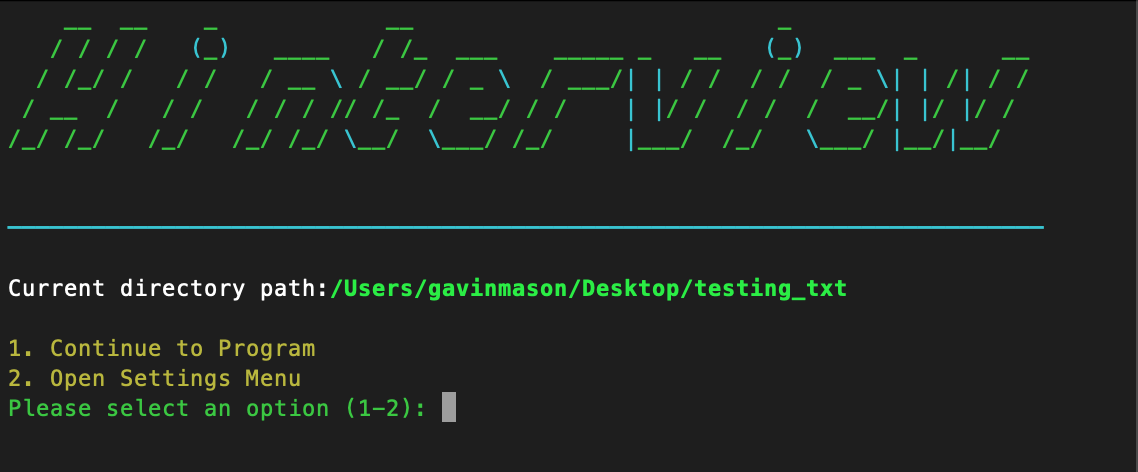
Intro Header & Options
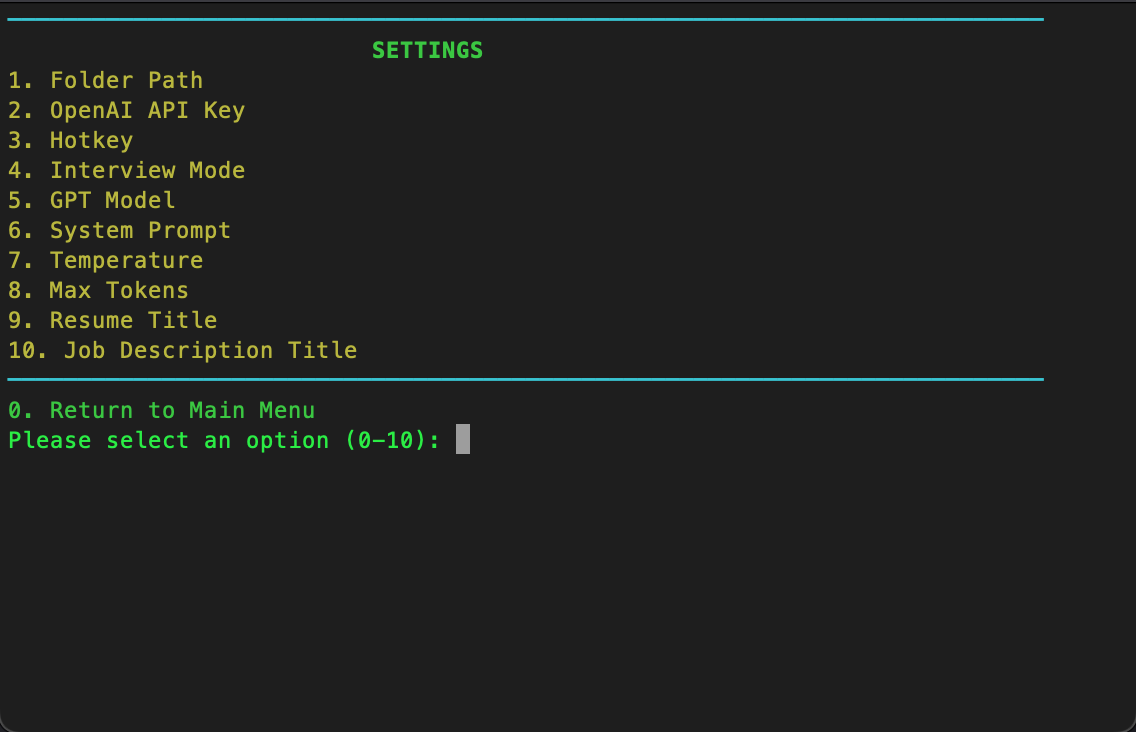
Settings Page
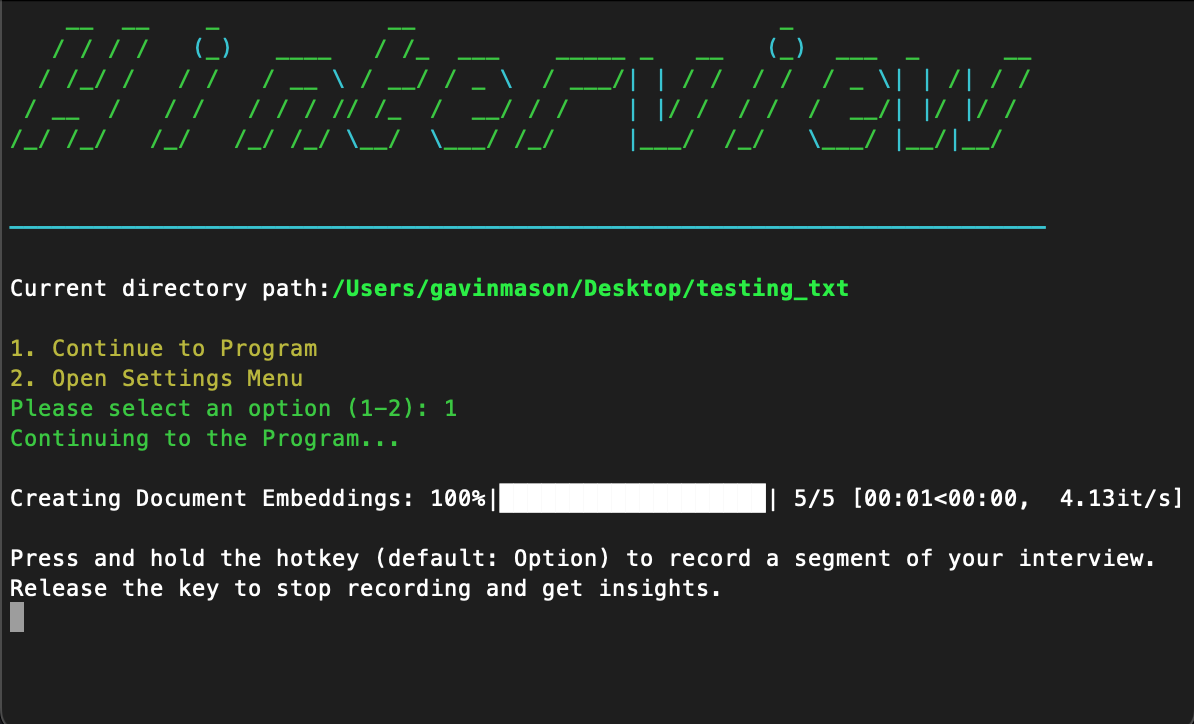
Continuing to Program
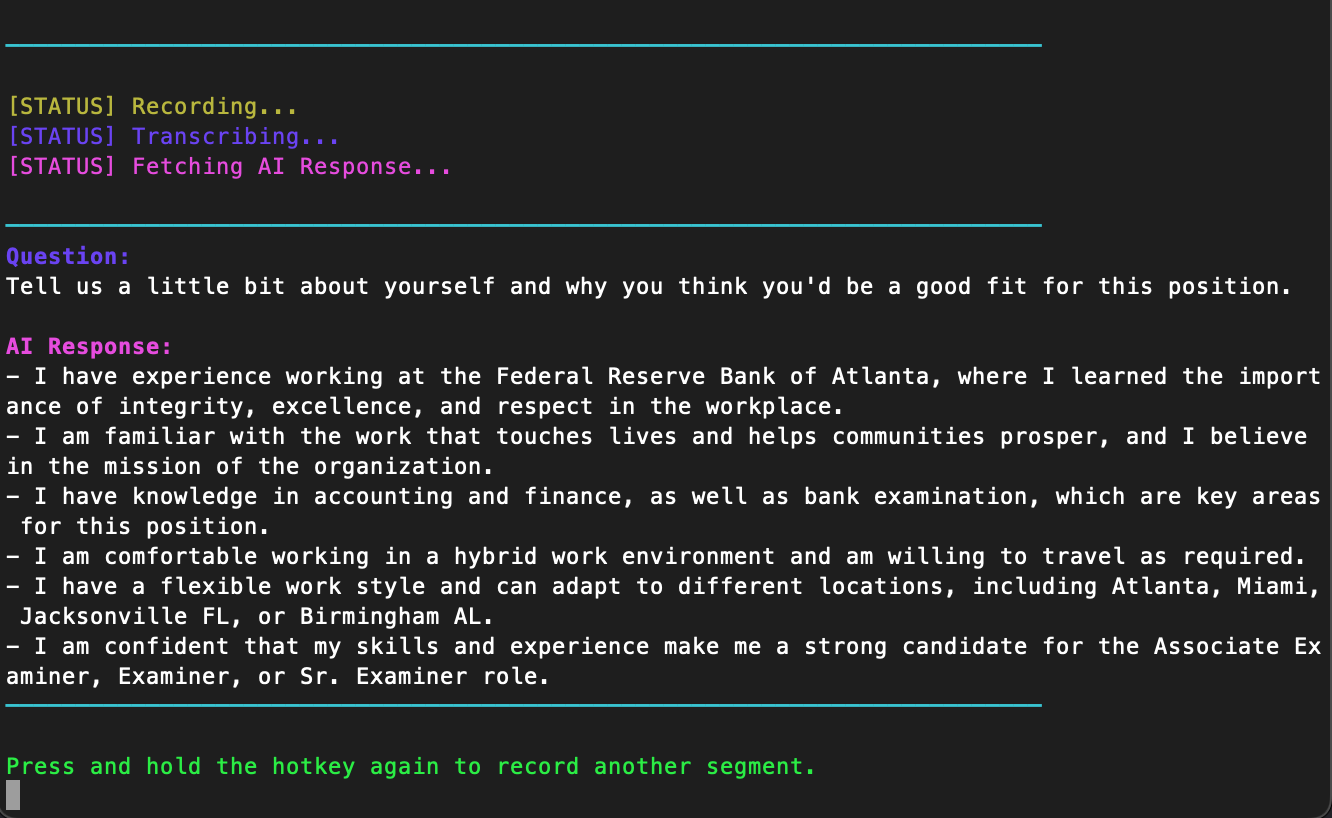
Use of Program
Various Additional Helper Functions
helper.py acts as the central connecting module that seamlessly integrates user interactions, audio recording, transcription, and response generation for the assistant application. The script takes advantage of multi-threading and event-driven programming to provide a smooth user experience. Below is a more thorough explanation of each part of the script:
Imports: The script imports necessary libraries and modules to handle various tasks.
threadingandasyncioare used for concurrent execution,pyaudioandpydubfor audio recording and processing,pynputfor keyboard input handling, andcoloramafor terminal formatting. Additionally, custom helper functions and configurations fromconfig.py,gui_util.py, andopenai_util.pyare imported.Constants and global variables: Several constants and global variables are defined in this section:
- Hotkeys and folder paths are fetched from the
config.pymodule. - PyAudio settings including format, channels, rate, and chunk size are initialized.
- An instance of
pyaudio.PyAudio()is created to manage audio streams. recording_eventandinterruption_eventare threading Events used to synchronize and control the flow of the program.
- Hotkeys and folder paths are fetched from the
record_audio(): This function is responsible for recording the user's voice input while the hotkey is pressed and saving it as an MP3 file:- The function first updates the user interface by calling
display_recording()fromgui_util.py. - An audio stream is opened, and the captured audio data is added to a list of frames while the
recording_eventis set. - After the
recording_eventis cleared (when the hotkey is released), the audio stream is closed. - The recorded audio frames are combined and converted into an
AudioSegmentobject from thepydublibrary. - The audio segment is exported as an MP3 file.
- The program updates the user interface again with
display_transcribing()to indicate the transcription process. - The recorded audio is transcribed using the
transcribe_and_clean()function fromopenai_util.py. - If transcription is successful and the process has not been interrupted (i.e., the hotkey hasn't been pressed again), the
display_processing()function is called to show that the response is being generated. - Finally, the
ask()function fromopenai_util.pyis executed usingasyncio.run()to generate a response based on the transcribed input.
- The function first updates the user interface by calling
on_press(key): This function listens for a specific hotkey press event:- If the hotkey is pressed and the
recording_eventis not set (meaning the recording is not already in progress), therecording_eventis set. - A new thread is started, calling the
record_audio()function to begin the audio recording process. - The
interruption_eventis set, signaling that any ongoing response generation operations should be stopped.
- If the hotkey is pressed and the
on_release(key): This function listens for a specific hotkey release event:- If the hotkey is released and the
recording_eventis set (meaning a recording is in progress), therecording_eventis cleared, signaling the application to stop recording. - The
interruption_eventis cleared, allowing any further processing to continue.
- If the hotkey is released and the
In summary, helper.py is the core module responsible for enabling users to interact with the application using hotkeys. It manages audio recording, transcriptions, and response generation in a smooth and efficient manner. By employing multi-threading and event-driven programming, it ensures that the application can simultaneously capture user input and process transcriptions and responses, resulting in a seamless and interactive experience for an interview assistance application.
#helper.py

import threading
import asyncio
from config import get_config, configure_user_settings
from gui_util import display_recording, display_transcribing, display_processing, \
    clear_screen, primary_gui
import pyaudio
from pydub import AudioSegment
from pynput import keyboard
from colorama import init, Fore
from openai_util import transcribe_and_clean, ask

init(autoreset=True)

df = primary_gui()

HOTKEY = get_config("hotkey")
FOLDER_PATH = get_config("folder_path")

FORMAT = pyaudio.paInt16
CHANNELS = 2
RATE = 44100
CHUNK = 1024
MP3_OUTPUT_FILENAME = "temp.mp3"
DEVICE_INDEX = 1  # Index for BlackHole 2ch
audio = pyaudio.PyAudio()

recording_event = threading.Event()
interruption_event = threading.Event()

def record_audio():

    frames = []
    display_recording()

    try:
        stream = audio.open(format=FORMAT, channels=CHANNELS,
                            rate=RATE, input=True, input_device_index=DEVICE_INDEX,
                            frames_per_buffer=CHUNK)

        while recording_event.is_set():
            data = stream.read(CHUNK)
            frames.append(data)

        stream.stop_stream()
        stream.close()

        audio_segment = AudioSegment(
            data=b''.join(frames),
            sample_width=audio.get_sample_size(FORMAT),
            frame_rate=RATE,
            channels=CHANNELS
        )
        audio_segment.export(MP3_OUTPUT_FILENAME, format="mp3", bitrate="64k")

        display_transcribing()
        transcription_result = transcribe_and_clean(MP3_OUTPUT_FILENAME)

        if transcription_result != "Transcription failed. Please try again.":
            if not interruption_event.is_set():  # Only process if not interrupted
                display_processing()
                asyncio.run(ask(transcription_result, df, interruption_event))
        else:
            print(Fore.RED + transcription_result)
    finally:  # Display the error message
        frames.clear()

def on_press(key):
    if key == getattr(keyboard.Key, HOTKEY) and not recording_event.is_set():
        clear_screen()
        recording_event.set()
        threading.Thread(target=record_audio).start()
    interruption_event.set()

def on_release(key):
    if key == getattr(keyboard.Key, HOTKEY) and recording_event.is_set():
        recording_event.clear()
        interruption_event.clear()
Main
main.py, is the main entry point for an application designed to assist users during job interviews using OpenAI's GPT models.
Here's a breakdown of the script:
Imports: The script imports helper functions from the
helper.pymodule.main(): This function starts a keyboard listener using thekeyboard.Listenerclass from thepynputlibrary. It listens for the press and release of a hotkey (e.g., Alt key) defined in yourconfig.pymodule. The providedon_pressandon_releasefunctions come from thehelper.pymodule.if __name__ == "__main__"block: This line runs the main function if the script is executed directly.
In summary, this script is the starting point for running the application that assists users during job interviews using OpenAI's GPT models. It listens for user interactions, such as pressing and releasing a hotkey, to record audio segments, transcribe them, and generate responses based on the GPT models. The main.py script brings together all other modules, like config.py, openai_util.py, gui_util.py, and helper.py, to create a seamless, interactive experience for the user.
#main.py

from helper import *

def main():

    with keyboard.Listener(on_press=on_press, on_release=on_release) as listener:
        listener.join()

if __name__ == "__main__":
    main()